Candidate Filtering Problem This Article Solves If you're looking for Casablanca products, the real issue isn't "how many results you see," but how to organize candidate products by brand, category, price, specifications, images, and link status, and to re-verify current information before placing an order. This article is for readers who have already seen candidate products on fashion-reps.net and want to quickly browse the site catalog, then buil
Candidate Filtering Problem This Article Solves
If you're looking for Casablanca products, the real issue isn't "how many results you see," but how to organize candidate products by brand, category, price, specifications, images, and link status, and to re-verify current information before placing an order.
This article is for readers who have already seen candidate products on fashion-reps.net and want to quickly browse the site catalog, then build a personal filtering sheet in Google Sheets. After reading, you should be able to do three things: narrow down candidates, record comparable information, and go back to product pages to verify product details that are still valid.
The "site spreadsheet" here refers to the product catalog that can be browsed by brand and category, not a freely editable Google sheet. The site is for discovering and viewing candidates; Google Sheets is for personal organizing, filtering, and collaboration. The two serve different purposes, and mixing them up can lead to mistaking old prices or old images as current facts. 🧭

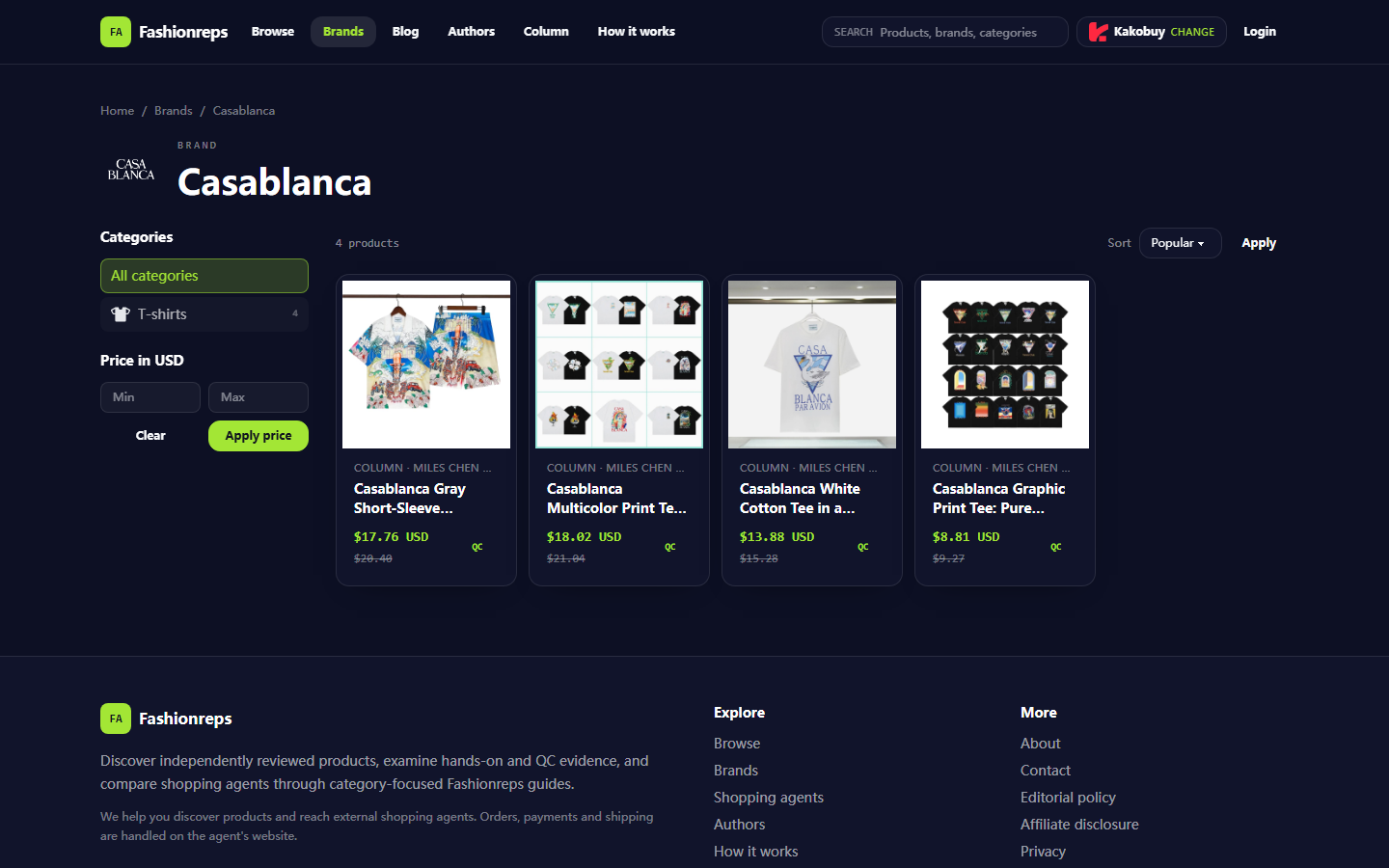
Image: Fashionreps' Casablanca brand catalog page, showing brand filter, category entry, price sorting, and candidate product cards.
fashionreps Spreadsheet Keyword and Category Entry
As of October 16, 2026, verification of the Casablanca brand catalog page shows the brand name, category filter, price range, sorting options, and 4 T-shirt candidates. The visible category entry is T-shirts, price filter supports minimum and maximum price, sorting includes Popular, Latest, Price: low to high, and Price: high to low.
So, the first round of filtering can be done in this order:
- First confirm the brand is Casablanca to avoid mixing in similar spellings or unrelated brands.
- Then select a category, e.g., T-shirts, to reduce comparison errors between different product types.
- If budget is clear, enter minimum and maximum price to first exclude candidates that obviously don't fit the budget.
- Use price low to high to see budget-friendly candidates, then use Latest or Popular to re-check if there are better items for review.
- Click on a specific product card to see product name, size, material, images, QC info, and current page status.
The candidate names currently shown on the page include Casablanca Gray Short-Sleeve Summer Top in Sizes M–XXXL, Casablanca Multicolor Print Tee Collection, Casablanca White Cotton Tee in a Loose, Thin Summer Cut, and Casablanca Graphic Print Tee. The catalog cards also show reference prices, but reference price is not the final settlement amount.
The site page also provides a shopping agent selection entry. The page explains that the Buy button will enter the selected shopping agent, and orders, payments, and logistics are handled by the external agent website. Therefore, catalog filtering only helps you discover candidates and cannot replace verification of product availability, service fees, international shipping, taxes, or after-sales rules on the agent's page. 💡
How to Set Up Brand, Category, and Status Columns in Google Sheets
Google Sheets is better for building your own candidate list. It's recommended to set up a row of field names first, then enter candidates one by one, rather than cramming entire product descriptions into one cell. A practical basic structure is as follows:
| Field | What to record | Filtering purpose |
|---|---|---|
| Brand | Casablanca | Filter brand to avoid mixing other candidates |
| Category | T-shirts | Distinguish category to avoid cross-category comparison |
| Product name | Full product name shown on the site | Quickly locate when returning to page |
| Reference price | Reference price shown on page | Initial budget filtering |
| Size information | Size clearly shown on page or to be verified | Determine whether to open product page |
| Image status | Viewed, to view, or unclear | Track whether visual evidence is complete |
| QC status | Available, not seen, or to verify | Record quality check data status |
| Page status | Accessible, redirected, to recheck | Prevent saving invalid pages |
| Checked date | Last verification date | Identify potentially outdated info |
| Decision | Keep, pending, or exclude | Manage next action |
When entering data, use fixed wording for brand and category. For example, Brand column should be consistently Casablanca, Category column consistently T-shirts; don't use multiple variants like T-shirt, tee, shirts, which can cause missed items when filtering.
You can set dropdown options for the Decision column: Keep, Pending, Exclude. Page status should also be set separately; don't combine "I like this product" and "this page is still valid" into one judgment. A candidate can be visually worth keeping, but page status still needs to be rechecked.
Google Sheets filter views are good for individual or team collaboration. You can first filter Brand to Casablanca, then filter Category to T-shirts, then sort by Reference price ascending to see budget range. If you need collaborators to use different filter conditions simultaneously, prefer filter views over directly changing everyone's table display.
Recording Images, Specs, and Links for the Same Candidate
Each candidate should have its own row, with product name, page URL, and image info in one-to-one correspondence. Don't put multiple products' images or links in the same notes cell; otherwise, later you won't be able to tell which image belongs to which row.
Recommended recording order:
- Copy the full product name shown on the site page.
- Record the product page URL and confirm it still points to the same candidate when opened.
- Record the reference price visible on the page and note the currency as USD; don't write reference price as final total price.
- Record size, material, or fit information clearly shown on the page; leave blank or mark as to verify if not shown.
- Record whether images are clear and whether you can identify print, color, and fit; don't infer fabric feel or actual thickness from images alone.
- Record whether QC images exist and whether they belong to the current product, not catalog thumbnails or other candidates.
- Fill in the last verification date, and update it when reopening the page later.
If a product page redirects, shows 404, fails to display product name, or only shows tags and category info, mark Page status as To recheck or Unavailable, rather than continuing to use old data. Page accessibility also doesn't mean price, inventory, size, and purchase conditions haven't changed.
Image records should be descriptive, e.g., "Front view visible, print position to confirm" is better for the filtering sheet than "quality is good." The former guides next verification; the latter lacks evidence and easily turns subjective judgment into fact. 🔎
Difference Between Quick Browsing and In-depth Organizing
Site catalog is good for quick candidate discovery. The brand page can first narrow down by category, price range, and sorting, and product cards help you decide which items are worth opening further. The goal at this stage is to reduce irrelevant candidates, not to make a final purchase decision.
Google Sheets is good for in-depth organizing. It can store multiple candidates with unified fields, compare reference prices, mark size gaps, assign review tasks, and keep each verification date. For teamwork, one member can handle images, one handle specs, one handle page status, but everyone updates corresponding fields on the same row.
The differences can be summarized as:
| Use case | Site product catalog | Google Sheets |
|---|---|---|
| Discovering candidates | More convenient, good for browsing by brand and category | Depends on existing data |
| Quick sorting | Can view by page-provided options | Can sort by custom fields |
| Unified spec recording | Limited by page fields | Can design own fields |
| Multi-person division | Mainly for viewing | Better for assignment and tracking |
| Current status verification | Need to open product page to confirm | Only saves last record, cannot replace recheck |
Don't treat Google Sheets as a real-time inventory system. Prices, links, and statuses in the sheet may change after saving, especially reference prices and agent purchase conditions. The sheet's role is to preserve your judgment basis and to-do list, not to guarantee that external pages never change.
When to Go Back to Product Page to Verify Current Info
Stop making decisions based solely on the sheet and reopen the site product page in the following situations:
- Product name doesn't exactly match sheet record.
- Reference price has changed, or currency isn't clearly recorded.
- Catalog shows sizes, but product page lacks corresponding size chart or options.
- Images can't determine color, print position, or style details.
- Need to confirm material, weight, fit, or care info.
- QC images missing, blurry, or appear to not belong to current candidate.
- Page redirects, won't open, or shows only category tags.
- Before clicking Buy and entering shopping agent.
Before purchase, also confirm on the selected shopping agent page that the product can be added to order, actual service fees, and available shipping routes. fashion-reps.net page itself states that orders, payments, and shipping are handled by external agent websites, so these conditions cannot be directly inferred from the brand catalog's reference price.
If destination country import restrictions, taxes, customs documentation, or return/exchange conditions are involved, also check the agent's and carrier's current instructions. Don't handle customs by under-declaring, splitting orders to avoid taxes, or evading inspection; declare truthfully according to destination country rules. 📦
Combined Site and Sheet Filtering Workflow
A reusable workflow:
- Open Casablanca brand catalog on fashion-reps.net.
- Select T-shirts category first to confirm candidate range.
- Use minimum and maximum price filters based on budget, and view both price sorting and latest sorting.
- Create a Google Sheets row for each candidate.
- Fill in product name, reference price, size, image status, QC status, and last verification date.
- Mark candidates with incomplete data as Pending, rather than directly excluding or recommending.
- Open product pages of kept candidates to re-confirm name, specs, images, and page status.
- Before entering the selected shopping agent, confirm current purchase conditions, fees, shipping routes, and after-sales rules.
- Keep only candidates with sufficient info, accessible pages, and fit within budget and size needs.
This workflow's key is to let site discovery, sheet organizing, and product page verification each have clear responsibilities. Site narrows range, sheet saves judgments, product page confirms current facts. Missing any step can lead to using old records to judge new orders.
Post-filtering Save and Recheck Checklist
Before saving the sheet, check item by item:
- Brand is consistently Casablanca.
- Category is clearly T-shirts or other actual category.
- Each candidate has its own row.
- Product name is from current page, not abbreviated from memory.
- Reference price notes USD and verification date.
- Size, material, and fit distinguish "clearly shown on page" and "to verify."
- Image and QC status are recorded separately.
- Page URL still opens and shows corresponding product.
- Reasons for excluded, pending, and kept are understandable.
- Before purchase, rechecked current conditions of shopping agent.
The final filtering result should not just be "the cheapest one." A more reasonable judgment: does the candidate meet category and size requirements, is page info sufficient, do images and QC evidence need supplement, is reference price still within budget, and are external agent fees and shipping conditions acceptable.
If you just want to quickly find a few Casablanca T-shirt candidates, using the site catalog directly saves organizing time; if you need to compare multiple products, collaborate with others, or keep review records, Google Sheets is more suitable. If product page info is incomplete, page status unstable, or you cannot confirm current purchase conditions, it's not advisable to continue placing an order based solely on sheet records.
Reader extracts
5 approved
Reader score 4.2 / 5 (5 ratings)
"How to organize candidate products" is exactly the problem nobody talks about. Everyone obsesses over how many results show up. Bookmarked this, and I'm stealing the specifications column idea for my own list.
pilar.mendez 5 / 5
ok article but honestly I still end up just scrolling the catalog instead of maintaining a sheet lol. the re-verify point is real tho, I got burned twice on sold out items. maybe I'll actually try it properly this time.
DreFromOhio 3 / 5
Small thing that helped me: sort by category BEFORE price, not after. Casablanca stuff splits so hard between shirts and the knit polos that price sorting just scrambles everything. Not sure if that matches how you set yours up but it worked for me.
sana_b 4 / 5
This finally explained why my Google Sheet kept falling apart. I had brand and price but no image column and no link status, so I was basically guessing every time. Added both last night, way easier to compare the tennis-club knits side by side.
leo.kwan 5 / 5
Been building my own Casablanca shortlist for weeks and this framing is honestly right. The spreadsheet was never the bottleneck, re-checking links is. I keep a column for 'last verified' now and it saves me from opening dead listings over and over.
marcus_thrift 4 / 5