This article solves a specific problem: you've found Celine items on fashionreps, but you're not sure if the current coupon applies to that item, the order amount, and the payment method. After reading, you can complete a verifiable pre-checkout check; if the page doesn't show clear discount terms, you should pause using an unconfirmed code. This article does not provide unverified coupon codes, nor does it guarantee savings. fashionreps mainly offers product discovery, QC info, and shopping gui
This article solves a specific problem: you've found Celine items on fashionreps, but you're not sure if the current coupon applies to that item, the order amount, and the payment method. After reading, you can complete a verifiable pre-checkout check; if the page doesn't show clear discount terms, you should pause using an unconfirmed code.
This article does not provide unverified coupon codes, nor does it guarantee savings. fashionreps mainly offers product discovery, QC info, and shopping guides. After clicking to purchase, you'll enter the selected shopping agent's process. Orders, payments, shipping, and after-sales are handled by the agent's website, so coupon usability ultimately depends on the agent's official page and checkout results. 🧾

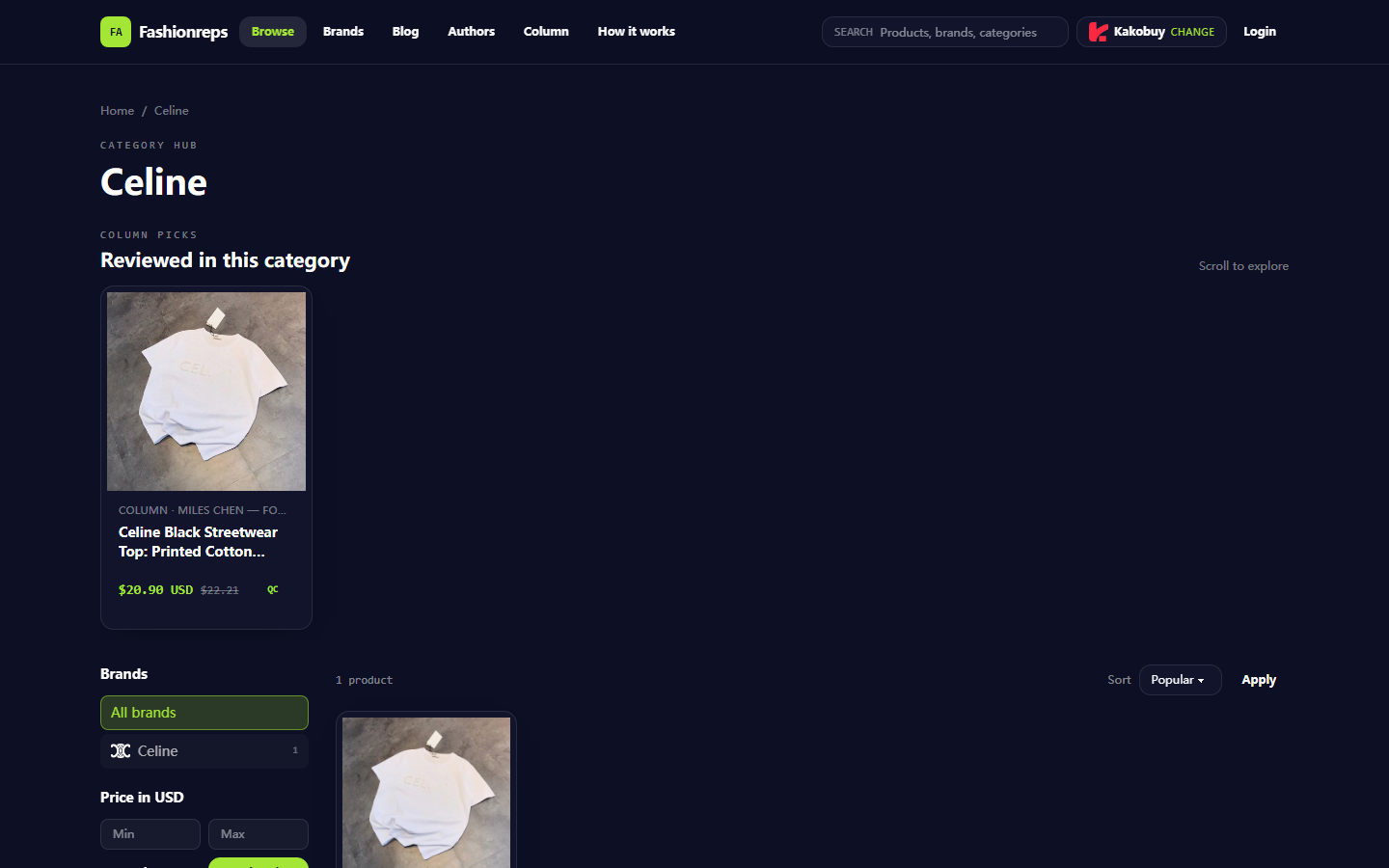
Image: Current visible Celine product category page record on fashionreps.
Define the Celine pre-checkout coupon verification task
First, break the problem into four answerable items:
- Which shopping agent does this coupon apply to, not just the fashionreps page.
- Does it cover the current Celine item, corresponding category, or specified seller.
- Is the order amount based on item price, item plus domestic shipping, or including international logistics fees.
- Has the discount been truly reflected in the cart or checkout page.
Just seeing entries like "coupon," "promotion," or "new user benefits" doesn't mean the current order can definitely use it. You must also find the applicable conditions, validity period, exclusions, and actual discount prompts. 🔎
Record item style, specifications, page price, and current link from the product page
Before leaving the product page, save basic information to identify the item:
- Product name and Celine logo.
- Color, size, style, or other specification options.
- Reference price and currency shown on the page.
- Whether the current product page has QC images or other visible verification info.
- After entering the shopping agent, the generated product URL, product remarks, or draft order information.
The provided fashionreps Celine category page record shows a Celine black street-style printed cotton top, with both fleece and non-fleece options displayed, reference price recorded at $20.90, previous reference price $22.21. This price is only a page record and cannot be directly considered the agent's final charge, nor can it be used to infer coupon applicability.
Prices, inventory, specifications, and links may change. If the product name, specifications, or price change after entering the agent, restart verification; don't rely on old screenshots or old order drafts.
Find the currently displayed coupon entry points and conditions on the target site
fashionreps page offers multiple shopping agent choices. After selecting an agent, coupon verification should shift to that agent's current public official entry points, usually including account coupon page, activity page, cart prompt, order confirmation page, or pre-payment discount selection area.
Check in the following order:
- Confirm the currently selected agent name and logged-in account.
- Check if there are available coupons, coupons to claim, or expired coupons in the account.
- Open coupon details and record applicable site, applicable category, minimum spend, discount cap, validity period, and exclusions.
- Check if the coupon requires claiming from an activity page or using a specific entry point for the order.
- Compare the coupon's conditions with the Celine item and order draft one by one.
If the official page only shows a "coupon center" but no available coupon details, don't treat the entry itself as discount evidence. If login is required to see conditions, use the actual displayed content after login; don't infer current rules from search results, old posts, or third-party screenshots. 📋
Check minimum spend, applicable categories, exclusions, and validity period
Coupon usability usually depends on multiple conditions being met simultaneously. It's recommended to record "met," "not met," or "unconfirmed" for each item in a memo:
- Minimum spend: Confirm the calculation base and whether it's based on pre-discount amount.
- Applicable category: Confirm whether the Celine item belongs to the coupon's covered category, not just judge by brand name.
- Seller or item exclusions: Some promotions may exclude specific sellers, pre-sale items, clearance items, proxy purchases, or special links.
- Discount cap: For example, the page shows a percentage discount, but the actual discount is limited by a fixed amount cap.
- Validity period: Record start time, end time, and applicable time zone.
- Usage limit: Confirm whether it's once per account, once per order, or repeatable during the activity.
- Fee scope: Confirm whether item price, domestic shipping, service fee, international shipping, and insurance count toward the threshold.
If the official description doesn't explicitly state whether Celine is applicable, mark it as "unconfirmed" rather than assuming based on similar categories. Especially note that the page's reference price may not equal the agent's checkout amount, and price changes can make an order go from meeting the threshold to not meeting it.
Check new user, payment method, and order status restrictions
Some promotions are only open to new accounts, first orders, or users in specified regions. Before checkout, confirm:
- Whether the account has completed orders or used similar promotions.
- Whether the promotion requires new registration, real-name verification, or completing specific account steps.
- Whether the payment method is limited to bank card, e-wallet, account balance, or other channels.
- Whether the promotion only applies to pending payment orders, not paid, canceled, or resubmitted orders.
- Whether there's a restriction that one account, device, address, or payment method can only enjoy once.
Don't register accounts repeatedly, bypass platform restrictions, or submit false information just to get new user benefits. Such practices may trigger risk control and affect refunds and after-sales. If terms require submitting personal identity or payment information, only do so on the agent's official secure page, and avoid disclosing complete order, passport, payment card, or shipping label information to unrelated persons. 🔐
Record discount prompts and payable breakdown separately in cart and checkout pages
In the cart stage, focus on checking if the item is added with the correct specifications and if the coupon is recognized. In the checkout stage, recheck the order total, as service fees, domestic shipping, international logistics, and taxes may appear in later steps.
It's recommended to save the following information:
- Item subtotal.
- Domestic shipping or seller shipping fee.
- Agent service fee or handling fee.
- Pre-discount total.
- Coupon name or identification info.
- Actual discount amount.
- International shipping fee, insurance fee, and possible taxes.
- Final payable amount and currency.
If the cart shows a discount but the checkout page reverts to original price, use the checkout page as the standard and pause payment first. If the page shows a discount but doesn't explain which fee the reduction corresponds to, don't assume it has already deducted international shipping or taxes. 💳
Also confirm whether the coupon stacks with other activities. Some systems automatically select one coupon, some require manual selection; if multiple coupons can't stack, compare actual discount amounts, not just coupon names. Don't repeatedly submit orders to test codes, and don't create payment orders repeatedly before confirming cancellation rules, to avoid duplicate orders or locked balances.
When no current coupon info is available, keep only a verifiable verification process
As of this article's verification scope, no currently valid Celine-specific coupon code, applicable agent, discount amount, or deadline is provided. Therefore, this article does not write any code as an available coupon, nor does it promise savings.
When no current official info is available, you can keep the following verifiable process:
- From fashionreps' product page, confirm item name, specifications, price record, and target agent.
- View current coupon details on the target agent's official account or activity page.
- Record key points of coupon terms in original text, display time, and applicable currency.
- Add the Celine item to cart and confirm specifications and order amount.
- Apply the coupon before checkout and verify actual discount amount.
- Only decide to continue when the checkout page shows final amount, payment method, and order status all as expected.
- If the coupon disappears, terms are unclear, order amount changes, or extra fees appear, pause payment and confirm with the target agent's official customer service.
This process can verify whether the coupon actually enters the current order, but cannot prove that the coupon will still be valid in the future. After promotion changes, re-verify; don't directly reuse old records. ⏸️
Celine pre-payment continue or pause checklist
Conditions to continue payment:
- Item name, specifications, and quantity are correct.
- Target agent matches current account.
- Coupon source, applicable conditions, and validity period are clear.
- Celine item does not fall under known exclusions, or official page clearly confirms usability.
- Both cart and checkout pages show expected discount.
- Item fees, agent fees, logistics fees, and other payable amounts are checked separately.
- Final amount, currency, and payment method fit your budget.
Situations to pause:
- Only third-party posts or old screenshots, no current official conditions.
- Coupon code cannot explain applicable category, threshold, or validity period.
- Checkout page does not show discount, or discount amount inconsistent with description.
- Item specifications, page price, or target agent changes.
- Page requires submitting payment info through insecure or unofficial channels.
- To meet the coupon, requires repeated registration, splitting orders, fabricating identity, or bypassing platform restrictions.
If the coupon is ultimately valid, the savings should be calculated based on the actual discount shown on the checkout page; the corresponding increased risks may include coupon expiration, additional fixed fees after order splitting, logistics fee changes, risk control review, or increased after-sales complexity. Suitable for buyers willing to check orders item by item and accept price and activity changes; not suitable for those who only pursue small discounts but cannot confirm fee structure or are unwilling to bear order change risks. ✅
Reader extracts
5 approved
Reader score 4.2 / 5 (5 ratings)
finally someone explains the actual process instead of promising savings. i always wondered if the coupon applied to the specific celine item or the whole cart. now i know to look at item, amount, and payment method together. thank u
kpoply 5 / 5
Appreciate that you didn't just throw random codes at us. The verifiable pre-checkout idea is solid and I'll use it before my next order. Rating 4 only because I wish there was a screenshot example of the discount terms area.
DreWatches 4 / 5
honestly helpful but a bit cautious. id still like to know if payment method even changes eligibility on fashionreps or if its just order amount. guess the answer is check the terms each time
Tsuki_88 3 / 5
This is exactly the practical thing I needed. The part about pausing when the page doesn't show clear terms makes sense - better than gambling on an unconfirmed code. Did the pre-checkout steps work for anyone with mixed carts though?
lilykc 5 / 5
Good reminder to actually read the discount terms instead of just pasting a code. I got burned last month assuming a coupon worked on a Celine bag only to find it excluded at checkout. Now I check the item page and order total first.
marco_finds 4 / 5