Introduction If you're filtering Stussy fall/winter jackets, the real issue isn't "which tool looks more convenient"—it's how to clearly record color, size, product detail pages, and QC photo evidence before deciding whether to proceed to pre-order verification. This article focuses on the Stussy jacket catalog visible on fashion-reps and the manual organization process in Google Sheets, helping you complete a single fi
Introduction
If you're filtering Stussy fall/winter jackets, the real issue isn't "which tool looks more convenient"—it's how to clearly record color, size, product detail pages, and QC photo evidence before deciding whether to proceed to pre-order verification. This article focuses on the Stussy jacket catalog visible on fashion-reps and the manual organization process in Google Sheets, helping you complete a single filtering task from candidate discovery to information review.
This article is for buyers who have already found product candidates, need to compare colors and sizes, and want to keep QC photo links. It does not apply to situations where the catalog page is mistaken for stock, size, or final price confirmation. Prices, stock, sizes, seller, shipping, and QC status on the page should all be re-verified before continuing with a purchase.
Buying Task This Stussy Fall/Winter Jacket Filtering Needs to Solve
The goal can be broken down into four actions:
- Find Stussy jacket candidates in the catalog that can proceed to further verification.
- Record product title, color, price reference, and detail page entry.
- Check whether the page provides visible information such as size, color, and QC photos.
- Mark still-missing fields as "pending verification" instead of filling them with guesses.
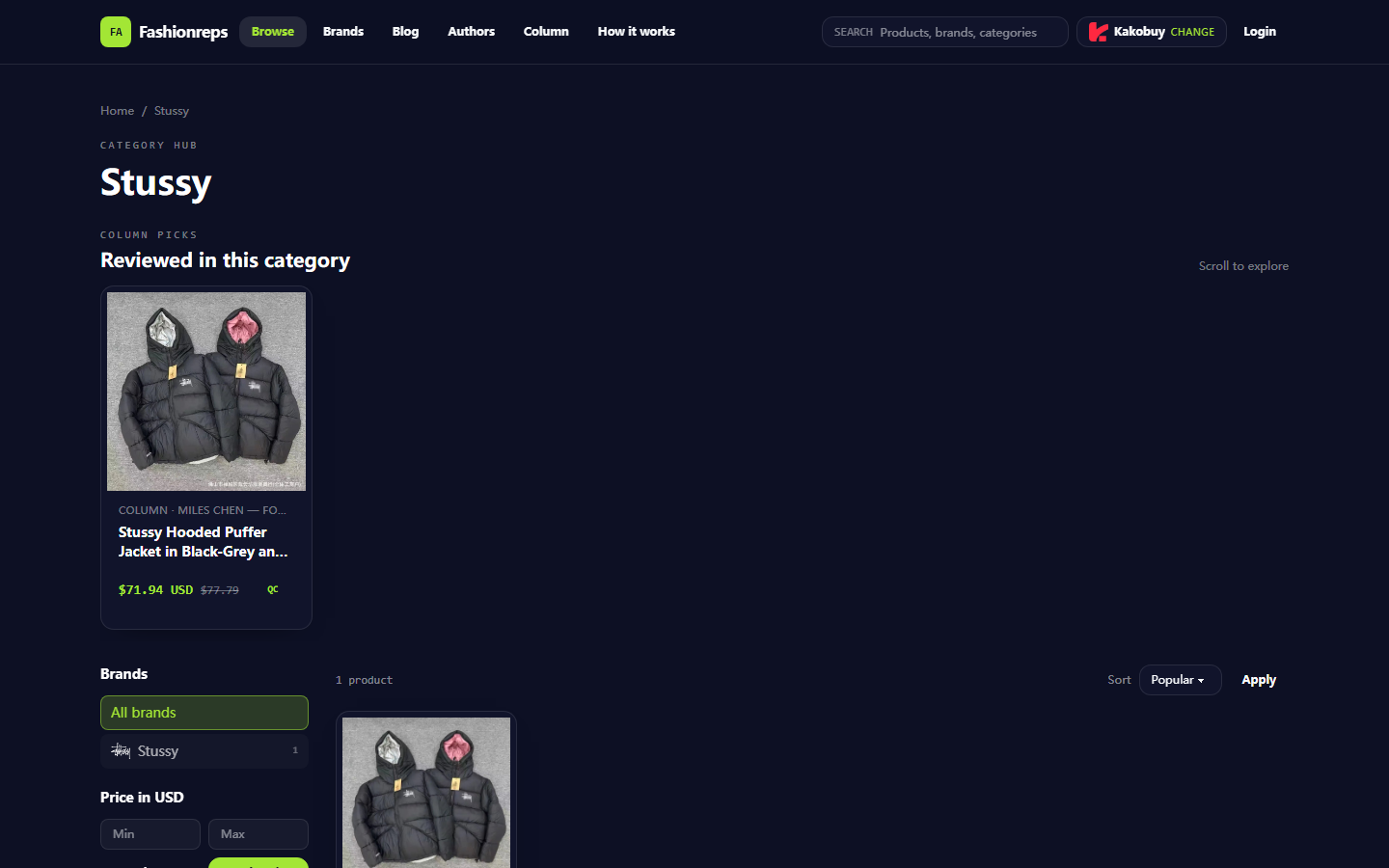
The currently visible catalog screenshot shows that the Stussy category page has a Stussy Hooded Puffer Jacket, with the title containing Black-Grey and Black-Pink colors, showing 800 Fill Power and a reference price of $71.94, while also retaining a previous reference price of $77.79. The prices here are reference information displayed on the page and do not equal the checkout amount or represent current stock.

Figure: The catalog page is for discovering candidates and entering detail verification; the prices and fields in the image should be based on reopening the page before publishing.
How to Browse Jacket Candidates on the fashionreps Website Spreadsheet
The fashion-reps website-based catalog is more suitable for the "discover first, then open" action. The visible page provides Stussy category entry, brand filtering, price filtering, and sorting options, and displays product cards, reference prices, and QC entry. The page also indicates that the product's purchase button will redirect to the user's chosen shopping agent, and orders, payments, and logistics are handled by the agent's website.
When using the catalog, you can follow this order:
- Enter the Stussy category, rather than judging whether a product exists based solely on the search summary.
- Use brand or price filters to narrow down candidates.
- Read the complete title on the product card and first record the color names and other visible specifications.
- Open the product detail page to confirm whether a size chart, color options, seller information, and QC photos exist.
- Open the QC photos or photo entry separately to confirm that the photos indeed correspond to the current product.
- Copy the detail page URL into your own record sheet to keep a reference for later review.
The catalog page is suitable for quick browsing, but it should not be considered a complete product database. Category pages may only show some fields, and the colors on product cards may be title information rather than directly selectable stock variants. If the page does not clearly show size or color options, record it as "not displayed" and do not infer based on common sizes or image colors.
How to Organize Colors, Sizes, and QC Photo Links in Google Sheets
Google Sheets is more suitable for creating a unified record across multiple candidates. It won't automatically verify products for you, but it can help you sort by color, size status, QC photo status, and review date, reducing omissions when repeatedly opening pages.
At minimum, set up the following columns:
| Field | How to record | Review requirement |
|---|---|---|
| Product title | Copy the visible title from the page | Do not abbreviate to the point of being unrecognizable |
| Color | Record according to page text, e.g., Black-Grey, Black-Pink | Distinguish title color from selectable color |
| Size | Record sizes clearly listed on the page | Fill in "pending verification" if no size chart |
| Reference price | Record currency, amount, and page date | Do not treat as final checkout amount |
| Product detail page | Save page URL | Open to confirm it's not a blank page or category page |
| QC photo | Save the photo or entry URL provided on the page | Confirm the photo corresponds to the same product |
| Verification date | Use YYYY-MM-DD format | Re-verify after changes in price, stock, or link |
| Status | e.g., "candidate", "pending verification", "can proceed to agent page" | Do not write "recorded" as "confirmed" |
For the color field, it's best to use a single format. For example, if the page says Black-Grey, keep that original wording; if you need to filter, you can add an additional standardized color column, but don't overwrite the original page text. This allows for filtering while still being able to return to the original evidence when ambiguity arises.
For the size field, distinguish three states: clearly listed on the page, shown but cannot confirm selectability, and not shown. For jackets, bust, length, sleeve length, and fill information can all affect fit, so S, M, L alone cannot replace full verification.
QC photo links should also have a status. You can use three stages: "not found", "found but pending check", and "checked and confirmed product identity". Only when the photo content, product title, or detail page information correspond to each other should you enter the last stage. Clear photos do not mean product quality has been proven, and catalog photos are not the same as physical inspection reports.
Step-by-Step Process from Candidate to Detail Page Using Both Tools
Step one, use the website catalog to discover candidates.
First record the product title, color, reference price, and QC entry shown on the page. Do not fill in guessed sizes at this stage, and do not assume all colors are still available just because color names appear in the title.
Step two, open the detail page to verify fields.
Check whether the product name is consistent and whether the page clearly provides color, size, seller, product photos, and other specifications. If the page redirects, returns empty content, or only shows a category list, mark that candidate as unable to complete verification.
Step three, put the original information into Google Sheets.
Keep the original page text, and at the same time split color, size, and QC status into separate columns. This way you can filter for conditions like "Black-Grey", "size pending verification", or "QC photos found", without mixing multiple facts in one notes cell.
Step four, return to the page to review changes.
Make dated records for price, stock, and link status. Especially when preparing to continue purchasing through a shopping agent, reconfirm that the product can still be opened and check shipping, service fees, taxes, and available routes on the agent page.
Step five, save the decision status.
"Keep candidate" means information still has gaps but is worth continuing to verify; "temporarily not using" means the page cannot support the current purchase decision; "proceed to next step" means the product information is sufficient to open the agent page for further checking. Do not use words like "authentic", "guaranteed", or "verified" that cannot be supported by current evidence.
Differences in Image Preview, Link Opening, and Distance to QC Evidence
The advantage of the website catalog is that it puts product discovery, thumbnails, categories, and detail page entry in one browsing flow. Users can first judge candidates from visuals and titles, then open pages to check fields. It is suitable for quickly narrowing down the range, but image preview alone only solves "whether it's worth continuing to look", and cannot replace size, stock, or QC verification.
The advantage of Google Sheets is displaying multiple candidates side by side. You can compare Black-Grey and Black-Pink at the same time, or filter all products with "size pending verification". But image links in the sheet are just records; unless you actually open them and confirm the source, you cannot treat the existence of the link as confirmed QC evidence.
The evidence distance between the two can be understood as follows:
| Scenario | Website catalog | Google Sheets |
|---|---|---|
| Discover candidates | Done through categories, filters, and product cards | Depends on already collected records |
| View photos | Usually more suitable for direct preview entry | Need to open links or use image preview |
| Compare multiple products | Suitable for quick browsing, but fields may not be uniform | Suitable for column filtering and side-by-side comparison |
| Track missing fields | Need to reopen the page | Can manage centrally with status columns |
| Evidence reliability | Depends on whether the page provides clear content | Depends on whether records keep original source and date |
Therefore, the website catalog solves "where to find", and Google Sheets solves "how to organize and review". Neither can alone replace the product detail page or agent checkout page.
Users Suited for the Website Catalog and Google Sheets
If you have only a few candidates and need to quickly view product photos, titles, and detail page entry, the website catalog is more suitable. It reduces the upfront work of manual table creation and makes it easy to start browsing from category and price conditions.
If you have already collected multiple colors, sizes, or product pages, Google Sheets is more suitable. Especially when you need to collaborate with others or record "who verified which field and when", the status, date, and notes columns in a sheet are more useful.
If your goal is to directly confirm stock, shipping, or final purchase conditions, both tools can only serve as preliminary organization tools. The final judgment should still return to the product detail page and the real-time page of the chosen shopping agent.
How to Keep Pending Verification Status When Color or Size Fields Are Missing
When fields are missing, the safest approach is to keep the gap rather than fill in content. You can use the following markers:
- "Not displayed": The page truly does not provide this field.
- "Pending detail page": Only the category card has been viewed so far.
- "Pending confirmation of selectability": The page mentions this color or size, but the selection status is unclear.
- "Visible in image, unconfirmed in text": The image seems to show a certain color, but the page text does not support it.
- "Invalid link, pending review": The current link is inaccessible, and it has not been determined whether the product has been taken down.
For example, when both Black-Grey and Black-Pink appear in the title, you can record both in the color column; if the page has no corresponding size chart, the size column should still say "pending verification". You cannot write sizes commonly offered for similar jackets into the current product record.
For QC photos, if there is only a photo entry without product number, color, or detail page association information, temporarily mark it as "found but pending check". This is more in line with the evidence scope than writing "verified" directly, and it facilitates later re-review.
Recording Template and Review Order for Combined Use
A practical combined workflow is: website catalog for discovery, Google Sheets for organization, product detail page for field verification, and shopping agent page for purchase condition verification.
Recommended review order:
- Is the product name consistent?
- Are colors clearly listed in text?
- Is a size chart visible and applicable to the current product?
- Do QC photos correspond to the current product and color?
- Has the reference price been recorded with currency and verification date?
- Is the product detail page still accessible?
- Does the agent page show actual price, service fees, shipping, and available routes?
- Do import restrictions, taxes, and declaration requirements for the destination country need additional confirmation?
If multiple people are organizing together, add columns for "verifier", "last updated date", and "pending issues". When collaborating, do not overwrite original fields; when conflicts are found, record the differences in notes and return to the page for re-verification.
The time savings from this method mainly come from reducing duplicate searches, repeated page openings, and repeated inquiries about the same field. It may save organization time but adds the workload of maintaining the sheet, updating dates, and re-checking links. It is suitable for users who need to compare multiple colors or sizes and want to keep a purchase basis; it is not suitable for those who want to order immediately based on a single image, or those unwilling to check real-time prices, stock, and logistics conditions before purchasing. 📋
Next Action Checklist
- Open the Stussy catalog page to confirm the target jacket is still accessible.
- Record the complete title, colors, and reference price displayed on the page.
- Open the detail page and check size, color options, and QC photo entry.
- Set up original fields, standardized fields, and status fields in Google Sheets.
- Mark missing information as "pending verification" and do not fill with speculation.
- Re-check product links, agent page prices, shipping, and applicable taxes.
- Only proceed to the shopping agent page when evidence sufficiently supports the next step. 🔍
Article Image
Reader extracts
0 approved
No approved comments yet.