First, Determine: Are the Duplicates Links or the Same Product Record? When organizing Montblanc watch candidates, do not delete records based on titles first. Two titles might point to the same page, or they might just have similar brand, series, or appearance descriptions. A safer approach is to keep the original records first, then separately check links, page titles, watch identifiers, colors, sizes, images, and source status. The verifiable [Fa
First, Determine: Are the Duplicates Links or the Same Product Record?
When organizing Montblanc watch candidates, do not delete records based on titles first. Two titles might point to the same page, or they might just have similar brand, series, or appearance descriptions. A safer approach is to keep the original records first, then separately check links, page titles, watch identifiers, colors, sizes, images, and source status.
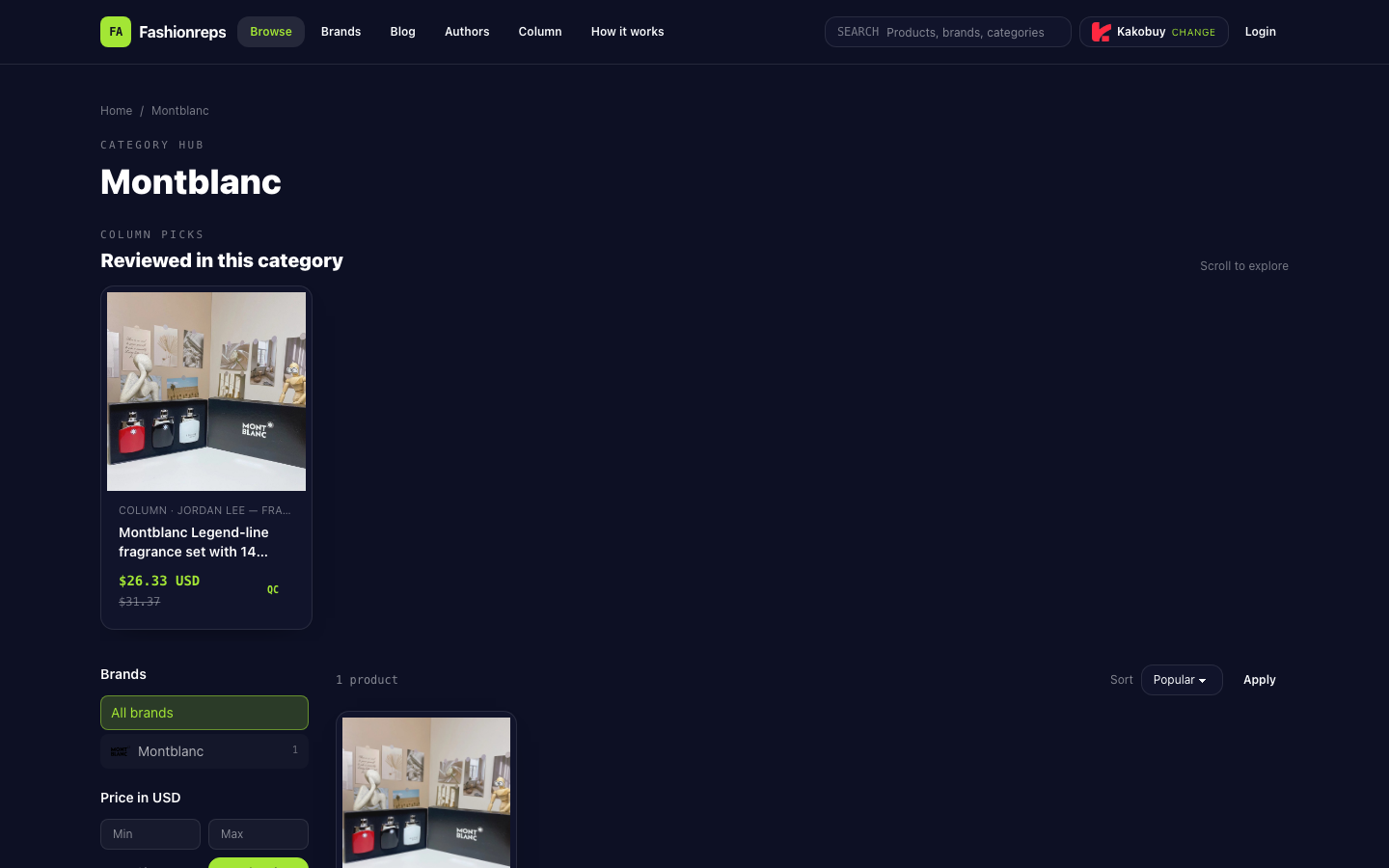
The verifiable Fashionreps page in this case is the Montblanc fragrance catalog page, not a watch catalog page. The page shows brand categories, search, product count, price filter, sorting, QC image entry, and external shopping agent entry, but the current evidence cannot prove that it contains Montblanc watch candidates. Therefore, we cannot confirm any specific watch model, color, size, stock, price, or purchase status based on it. The following method is for organizing candidate records, not for treating unverified records as purchasable recommendations.

Figure: Diagram of product fields and link status verification, illustration, not physical, QC, or hands-on evidence.
Step 1: Review Each Link on the Catalog Page
First, open each original link in the candidate spreadsheet separately and record the actual information displayed on the page. The focus of the review is not whether titles are similar, but whether the page provides enough evidence to determine if they point to the same record.
It is recommended to check in the following order:
- Copy the original link, keep the full address, and do not delete parameters or rewrite the path first.
- Compare the page title with the title in the candidate record, and mark differences in brand, series, model, or watch identifier.
- Record the color, size, and image information that actually appears on the page; leave blank fields that are not displayed on the page, and do not fill in based on images or titles.
- Check whether the page has available QC images or other product evidence. The existence of an entry does not mean that every candidate has verifiable images.
- Record the current status of the page and the last verification time. If the link cannot be opened, the page content does not match, or evidence is insufficient, mark it as pending verification first.
The Fashionreps page itself shows catalog browsing methods such as product search, price filter, and sorting, and also displays external shopping agent selection entry. The page also states that orders, payments, and shipping are handled by the agent website. Therefore, catalog review is suitable for confirming the product information and source entry presented on the page, and should not be treated as proof of inventory, shipping costs, or transaction results.
Step 2: Normalize Titles, but Keep Original Titles
The purpose of normalizing titles is to assist filtering, not to replace evidence. You can create an auxiliary field to unify capitalization, consecutive spaces, and common punctuation, while preserving the original title for manual review.
For example, you can follow these principles:
- Remove leading and trailing spaces, and unify consecutive spaces.
- Unify capitalization or full-width and half-width punctuation, but do not delete characters that may represent a model.
- Mark obvious title decoration words separately, and do not directly erase them from the original title.
- Split brand, series, watch identifier, color, and size into separate fields.
- For fields that cannot be confirmed, use "Not shown" or "Pending verification" instead of filling in speculative values.
If the normalized titles of two records are the same, it only means they are worth reviewing side by side, and it does not directly indicate they are the same model. The final judgment must be combined with the original link, page identifier, image, and other confirmed fields.
Step 3: Create a Deduplication Record in Google Sheets
Google Sheets is suitable for saving verification results for multiple candidates, filtering conflicting fields, and recording processing decisions. Its role is organization and collaboration, not an automatic substitute for product page verification.
It is recommended to use at least the following fields:
| Field | Purpose |
|---|---|
| Original title | Save the initial title text of the candidate record |
| Normalized title | Used to filter title variants and suspected duplicates |
| Original link | Keep the unmodified page address |
| Suspected duplicate link | Fill in links that may be the same, similar, or redirect to the same record |
| Confirmed fields | Fill in only the brand, series, watch identifier, color, size, etc. that are actually displayed on the page and have been verified |
| Conflicting fields | Record fields that are inconsistent between different pages or different records |
| Image or QC status | Record whether there are verifiable images; do not treat the entry as image evidence |
| Last verification time | Indicate the verification time corresponding to this judgment |
| Processing result | Use Keep, Merge, Pending verification, or Exclude |
| Judgment notes | Write the specific basis for the decision |
When filtering, first filter by normalized title, then view the original links and confirmed fields of the same group of records. If the links are different but the page title, watch identifier, and image cannot prove consistency, keep it as pending verification instead of forcefully merging to reduce rows.
How to Handle Title Variants and Field Conflicts
Title variants can generally be divided into three categories: only differences in capitalization or spaces; different descriptive words on the same page; and real differences in page, model, or key fields. The first two categories can enter the same suspected duplicate group, and the third category must retain differences and be further verified.
Field conflicts should be recorded separately. For example, one record has a certain color, and another does not have color; this is not a color conflict, but a difference in information completeness. Only when two pages give different values for the same field should it be marked as a conflict. When there is no evidence to judge which value is correct, do not overwrite one record with a guess.
You can use the following judgment order:
- Does the page link actually point to the same address or the same product record?
- Are the brand, series, and watch identifier in the page title consistent?
- Are fields such as color and size clearly displayed on the page?
- Does the image support the judgment of the same record? Images can only be part of the page evidence and cannot replace missing model information.
- Is there any inexplicable field conflict?
As long as key identifiers are inconsistent or the page cannot be opened, do not mark the record as confirmed same item.
Four Processing Results
After deduplication is completed, each record should have a clear destination, rather than just a vague "possibly duplicate."
- Keep: Evidence is sufficient to show that the record exists independently, or it is the one with the most complete information and clearest source in the group.
- Merge: When it can be confirmed that multiple records point to the same product or the same page, merge the links and difference descriptions into the main record, while preserving the original links and judgment basis.
- Pending verification: Titles are similar, fields are incomplete, images are insufficient, link status is unclear, or there is an inexplicable conflict.
- Exclude: The link is invalid, the page content clearly does not match, or after verification it does not belong to the current Montblanc watch candidate scope.
"Exclude" does not mean proving that the product does not exist, it only means that it should not continue to be used as a current candidate record. For pages that cannot be accessed or lack sufficient product evidence, "Pending verification" should be used as a priority rather than direct exclusion.
Final Check: Avoid Mistaking Organizing Results for Purchase Conclusions
Before saving, check four points line by line: whether the original link is still retained, whether the normalized title has not overwritten the original title, whether conflicting fields have a basis, and whether the last verification time corresponds to this review.
The Montblanc page verified in this case belongs to the fragrance catalog and cannot support specific product judgments for Montblanc watches. Therefore, any watch candidate, before obtaining the corresponding watch page, real product fields, or valid QC evidence, can only be treated as an organizing candidate record, and cannot be written as confirmed same item, in-stock recommendation, price conclusion, or purchase suggestion.
Reader extracts
5 approved
Reader score 4.2 / 5 (5 ratings)
Nice writeup. One thing — I keep a spreadsheet column for "last checked date" on each link so I know when a page went dead. Pairs well with what you wrote about source status. Would love a follow-up on handling dead links once you've confirmed they're gone.
sara.watches 4 / 5
been collecting replicas for years and link hygiene is the most underrated part of catalog work. color/size mismatch fields are where most people slip up. good to see someone write this down properly instead of the usual vague advice.
MtB_Timekeeper 5 / 5
helped a bit. still confused about when a duplicate is actually the same product record vs just a relist. maybe a screenshot example would make it clearer. the identifiers tip is useful though, didnt think about using those.
KevlarInk 3 / 5
Solid approach but I'd add: check the caseback photos too. I've seen two records with different titles that ended up being the same 4810 reference just shot from different angles. The link check is step one, for sure, but images are the tiebreaker for me.
watchbox_dan 4 / 5
this is exactly what i needed. i had like three montblanc listings saved that looked identical and i was ready to delete two of them. the point about checking links first instead of titles saved me from wiping out a legit variant. i never thought about checking source status either. bookmarking this.
patekpatrol 5 / 5