Clarifying the Specific Buying Task That Puma Shoe Filtering Needs to Solve If you've already seen multiple shoes with Puma in the title but can't quickly tell whether the color, size, product image, and purchase link match up, this guide solves a concrete task: filter out Puma candidates that meet color and size requirements from fashionreps' website-style product catalog, then use Google Sheets to build a reviewable comparison record, and finally decide whether
Clarifying the Specific Buying Task That Puma Shoe Filtering Needs to Solve
If you've already seen multiple shoes with Puma in the title but can't quickly tell whether the color, size, product image, and purchase link match up, this guide solves a concrete task: filter out Puma candidates that meet color and size requirements from fashionreps' website-style product catalog, then use Google Sheets to build a reviewable comparison record, and finally decide whether to continue gathering evidence, proceed to QC inspection, or hold off on buying. 👟
Here, "Puma" can only serve as a catalog title or category clue, not automatically prove that the item is an authentic Puma product. Taking the verifiable product page in this example, the page title uses Puma, but the specifications list the brand as Kukatong, so brand attribution must be checked separately, not just by relying on the title or product images.
This article is not for readers who want to get an "authenticity guarantee," real-time stock, final shipping cost, or a fixed landed price directly. Product pages and shopping agent pages may change; prices, stock, service fees, international shipping, taxes, and return/exchange conditions should all be re-confirmed before ordering. The catalog information described in this article is organized as of October 19, 2026, and the QC update date shown on the product page is September 26, 2026.
Verifying fashionreps' Website-Style Spreadsheet Categories, Search, and Product Cards
fashionreps' visible navigation includes brand, blog, author, Column, usage instructions, and a search entry. For filtering shoes, a safer order is to first enter the product card from the Puma category or search results, then open the specific product page to check the specifications, rather than treating the title in the search results as a complete product record.
The product page can provide several types of information helpful for purchasing decisions: product title, reference price, size range, color, material or construction description, images, QC Photos entry, purchasing agent entry, and evidence explanation. The page also reminds that the price is not the final amount to be paid; service fees and international shipping costs need to be confirmed on the shopping agent's website.
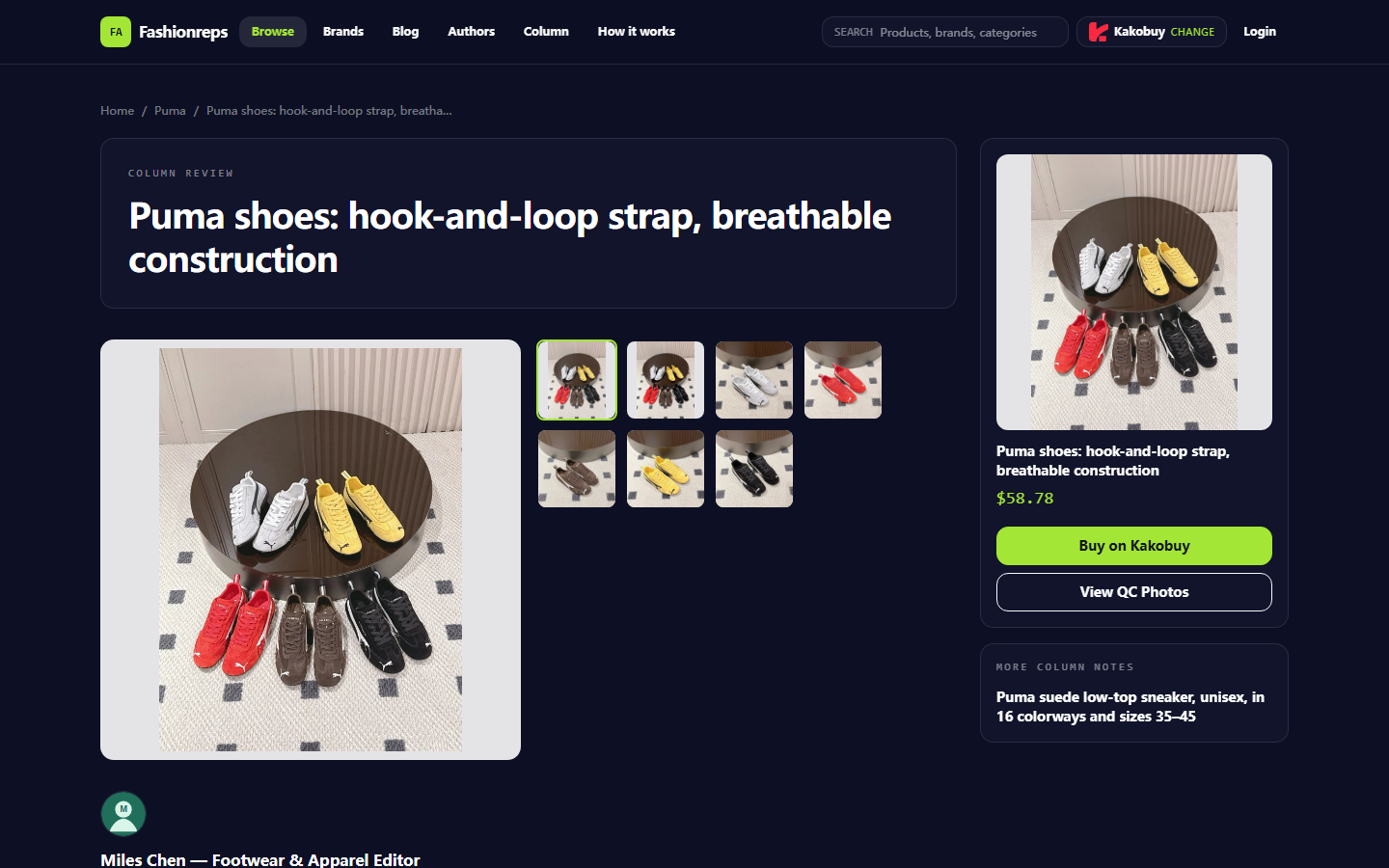
A visible children's shoe example shows that the product is marked in sizes 26 to 37, and the specifications provide the insole length corresponding to each size. The colors include black, gray, red, and yellow, and the construction description includes a single Velcro strap, synthetic leather upper, and rubber outsole. The page also indicates that no independent buyer reviews or related discussions were found for this product. This information is sufficient to create a candidate record, but not enough to prove stock, authenticity, durability, or wearing comfort.

Image: On the product page, you should focus on color, size, specifications, QC photo entry, and purchasing agent entry. Image source: fashionreps product page; always refer to the current page displays.
When using the website-style catalog, you can read the product card in the following order:
- First look at the title and category to confirm it is indeed a shoe, not clothing, accessories, or related recommendations.
- Then look at color and size, and record the options explicitly stated on the page; do not infer the full colorway from image colors alone.
- Open the product details to check whether the specification table provides insole length, material, closure method, and other information.
- Check whether there are QC Photos or other public evidence, and note the evidence's update time.
- Finally, check whether the purchasing agent entry still leads to the target product, not just a generic agent selection page.
Setting Up Color, Size, Link, and Note Fields in Google Sheets
Google Sheets is better suited for saving already-filtered candidates and keeping a separate record of "what was seen" and "what evidence is still missing." It is recommended that each row correspond to only one product or one specific variant; if the black size 26 and red size 27 of the same product need to be verified separately, they can be split into two rows to avoid mixing color and size.
Suggested fields:
- Product title: keep the full page title for easier re-searching.
- Catalog category: e.g., Puma, shoes, children's shoes, or other explicit page category.
- Color: record only the colors explicitly listed on the page.
- Size: record the page's size range; if insole length is available, save it separately.
- Size basis: fill in foot length, insole length, or not provided by page.
- Product page: save the target product page URL, not just the search page URL.
- QC status: not viewed, viewed, insufficient information, or pending evidence.
- Brand verification: title brand, spec brand, unspecified, or conflict.
- Price status: reference price, pending agent confirmation, or re-verified.
- Stock status: page not stated, pending agent confirmation, or verified.
- Notes: record missing information, risks, and next steps.
- Last verified date: update after each re-check of price, stock, or link.
You can use filters to first select "Color," then filter "Size" or "Size basis." If the size information is a text range, it is recommended to keep the original text while also creating a sortable numeric field, such as minimum size, maximum size, or insole length value. This way, the original page information is not altered, and comparison is easier.
The color field is suitable for a dropdown option, but do not pre-add colors that do not appear on the page. The size field should not mix adult sizes, children's sizes, and insole lengths in one column. For products that only state "26–37" without insole length, mark it as "needs supplementary measurement basis" rather than jumping to a fit judgment.
Comparing Website Browsing and Spreadsheet Filtering Processes Using the Same Batch of Puma Candidates
The advantage of the website-style catalog lies in its contextual completeness. Product pages usually place the title, images, specifications, evidence, QC entry, and purchasing agent entry on the same browsing path, which is suitable for initial discovery of products and verifying whether the page corresponds to the target model. Its limitation is that it is not easy to compare multiple products simultaneously by custom fields, especially when color, insole length, brand conflict, and evidence status require opening pages back and forth.
The advantage of Google Sheets is putting information from different pages into one view. You can simultaneously filter for products that are black, in a specific size, already have QC photos, or have conflicting brand information, and you can also assign a next-step status to each candidate. Its limitation is that the spreadsheet does not automatically prove that links are valid, images belong to the target product, or page data is still up to date; each item must be re-verified on the original product page.
| Comparison Item | fashionreps Website-Style Catalog | Google Sheets | More Suitable Stage |
|---|---|---|---|
| Discovering products | Browse via categories, search, and product cards | Depends on already-entered candidates | Initial discovery - website |
| Viewing color and size | Read original information on product page | Filter and sort by columns | Summary comparison - spreadsheet |
| Matching images and specs | Can view in context of target product page | Can only save image descriptions or page URLs | Evidence check - return to website |
| Link confirmation | Directly open product page and purchase entry | Need to manually click back to check | Use both |
| Risk recording | Page may provide evidence explanation | Can record brand conflicts, missing fields, and dates | Tracking risks - spreadsheet |
| Collaboration and review | Need to repeatedly browse pages | Can share filtering results and notes | Multi-person organization - spreadsheet |
In practice, first select the same batch of candidates from the website catalog, then enter the same fields into Google Sheets. Do not first batch-fill speculative values in the spreadsheet and then go back to find page evidence, as this easily leads to mistaking image colors, title brands, or old prices for verified facts. 🔎
Checking Whether Images, Size Info, and Links Lead Back to the Target Product Page
Images can only help confirm what the page displays; they cannot replace the size chart, material description, or QC evidence. When checking images, confirm that the shoe style, color, and product title are consistent. If the page has only one image, or the image cannot clearly distinguish colors, write in the spreadsheet notes "Image insufficient to confirm colorway" and do not add color names on your own.
Size checking should prioritize insole length or foot length recommendations. The example product page above lists sizes 26 to 37 with corresponding insole lengths, and the page recommends adding 1 cm to the actual measured foot length for selection. This recommendation is specific to that product page and should not be generalized to all Puma shoes. Different lasts, adult shoes, and children's shoes cannot directly apply the same addition standard.
Link checking involves at least three steps:
- Open the product page from Google Sheets and confirm it does not redirect to an empty page, a tab, or an unrelated product.
- On the product page, confirm that the title, image, and specifications still correspond to the same candidate.
- From the product page, enter the purchasing agent entry and confirm that after selecting the current agent, you can still locate the target product, not just land on the agent's homepage.
If after opening the link the product title changes, the page becomes empty, the specifications disappear, or the purchase entry becomes invalid, change the status to "Pending evidence" or "Hold purchase." Do not treat an old address saved in the spreadsheet as currently valid.
Recording Differences in Mobile Viewing, Link Copying, and Back Navigation
Mobile is better for quickly viewing product images, saving page URLs, and recording a single candidate, but long specification tables, multiple filter conditions, and note fields are more easily truncated. After copying a link on mobile, check that the copied content still points to the target product, not to search results, the current category page, or a generic shopping agent URL.
Pay special attention to browser history when navigating back. If you go from a product page to QC images or a purchasing agent and then return, the page may go back to a category page, search page, or previous product. It is recommended to save the target product page URL in Google Sheets and reopen that URL each time you re-check, to reduce mismatches caused by relying on the browser's back button.
When collaborating, one organizer can be responsible for entering titles, colors, sizes, and page URLs, while another reviewer only checks links, image correspondence, and missing evidence. The reviewer should keep a "verified date" and specific notes, not just change the cell color to green, because color alone cannot explain the verification basis. 📱
Dealing with Uncertainty When the Catalog Lacks Stock, Price, or Update Time Information
The reference price shown on the catalog page does not represent the final payment amount. Product price, service fees, international shipping, taxes, and available routes should be re-confirmed on the shopping agent's page. The current product page also clearly reminds that the final product price, service fee, and international shipping cost need to be confirmed by the shopping agent, so you cannot calculate the actual landed cost from the catalog price.
When stock is missing, the correct recording is "Page does not state stock, pending agent confirmation," not "In stock." Similarly, when the page does not show an update time, record "Update time not displayed," and do not substitute the scraping date for the product information update date. Only when a page update date is clearly visible can that date be used as part of the page evidence.
When brand information conflicts, record the title brand and spec brand separately. In the sample above, the title uses Puma, but the specification data lists Kukatong, and the page evidence does not establish a basis for it being genuine Puma. For buyers who value brand authenticity, this conflict is enough to put the candidate on hold; for those who only care about shoe style, color, and size, they should still be clearly aware that they are dealing with a product whose brand information is unconfirmed.
When there are no independent reviews or discussions, do not replace evidence with words like "reliable," "good quality," or "worth buying." You can write "No independent reviews or related discussions found for this product," and set the next step to viewing QC photos, asking about available sizes, or waiting for more evidence. Lack of evidence does not mean the product is necessarily problematic, but it increases uncertainty in the purchase decision.
Moving from Filtering Results to Gathering Evidence, QC Inspection, or Holding Purchase
After filtering is complete, candidates can be divided into three categories:
- Gather evidence: color or size looks like a match, but missing insole length, stock, update time, or valid purchase entry.
- QC inspection: the product page already has the target variant information and can open relevant QC photos or other public evidence, but still need to check whether the photos correspond to the target model.
- Hold purchase: unacceptable brand information conflict, broken link, missing key size, or final cost and route cannot be confirmed.
Before entering QC inspection, first confirm that you are filtering the same product variant. If any one of color, size, or shoe style is inconsistent, you cannot use another model's QC photos as evidence for the current candidate. QC photos also cannot prove that the shoes are necessarily comfortable, durable, or brand-authentic; they only help check publicly visible workmanship and appearance clues.
If you decide to proceed with the purchase, re-confirm on the shopping agent's page the price, service fee, international shipping route, tax responsibility, available stock, and after-sales conditions. When customs clearance is involved, declare truthfully according to the destination country's regulations, and do not reduce costs by under-declaring, splitting orders to avoid taxes, or evading inspection. If you decide to give up, keep the reason for hold in the spreadsheet to avoid re-verifying the same issue next time.
Running the same batch of candidates through both website browsing and Google Sheets filtering mainly saves time on repeated searching and recording, not actual verified cash amounts. The added risk is that the spreadsheet may save old prices, old stock, broken links, or unconfirmed speculative fields. This method is suitable for buyers who need to compare multiple colors and sizes, want multi-person collaborative review, and are willing to re-confirm facts before ordering; it is not suitable for people who want to quickly confirm authenticity, stock, and final landed price based only on titles and images. 🧾
The final judgment should be based on the target product page, shopping agent page, and currently visible evidence: the website is responsible for discovery and re-checking original context, Google Sheets for filtering, recording, and collaboration, and neither can replace item-by-item verification of color, size, link, stock, cost, and brand information.
Reader extracts
5 approved
Reader score 4.2 / 5 (5 ratings)
Clear task, clear method. I like that it narrows the goal to filtering by color and size instead of trying to cover every possible shoe detail. Made my Puma search feel manageable for once.
quiet_koala 5 / 5
I've been doing something similar but with notes on my phone, which was a disaster. Moving to a sheet tonight. The part about matching product image to purchase link before deciding is the step I always skip and regret.
SneakerSam88 4 / 5
Decent breakdown but I wish there were screenshots of the sheet layout. The filtering logic makes sense, I just learn better seeing the actual columns. Still useful for keeping Puma candidates organized.
daveonfeet 3 / 5
Google Sheets over a random spreadsheet any day. I can add a column for the seller link and a yes/no for size confirmed, then sort by color. This article actually describes a workflow instead of vague tips.
lena.k 5 / 5
The color and size filter idea is exactly what I needed. I kept finding Puma pairs in the wrong colorway and wasting time. Building the comparison sheet first, then checking each link, sounds slower but way less messy.
mike_thrift 4 / 5